

Observe Bub with tapes and Phoenix
This tutorial gives you two observability paths for one Bub workspace:
- Run a small natural-language task, then ask Bub about the tape it just wrote. This works without a tracing backend because Bub records each session as an append-only tape.
- Send OpenTelemetry telemetry to Phoenix while running the same kind of task. Use this when you want GenAI traces outside the local workspace.
By the end, you will have a quick local health check and a Phoenix trace view for agent, model, and tool activity.
Before you begin
Section titled “Before you begin”You need:
- Bub installed and runnable with
uv run bub --help. - One workspace where
uv run bub run "What tools do you have?"can call your configured model. - Docker or Podman if you want to run Phoenix locally.
- The Logfire extra installed before starting Bub with Phoenix:
uv sync --extra logfire- The
bub-tapestore-otelcontrib plugin installed for richer tape and agent spans:
bub install bub-tapestore-otel@main1. Ask Bub for its current tape
Section titled “1. Ask Bub for its current tape”Run an English natural-language task first:
uv run bub run "What tools do you have, and what small tasks are they useful for?"Then ask Bub to inspect the tape that was updated by that turn:
uv run bub run ",tape.info"Expected output looks like this:
name: becda04eb9f7369c__065943a03cbe6395
entries: 98
anchors: 2
last_anchor: session/start
entries_since_last_anchor: 44
last_token_usage: 7458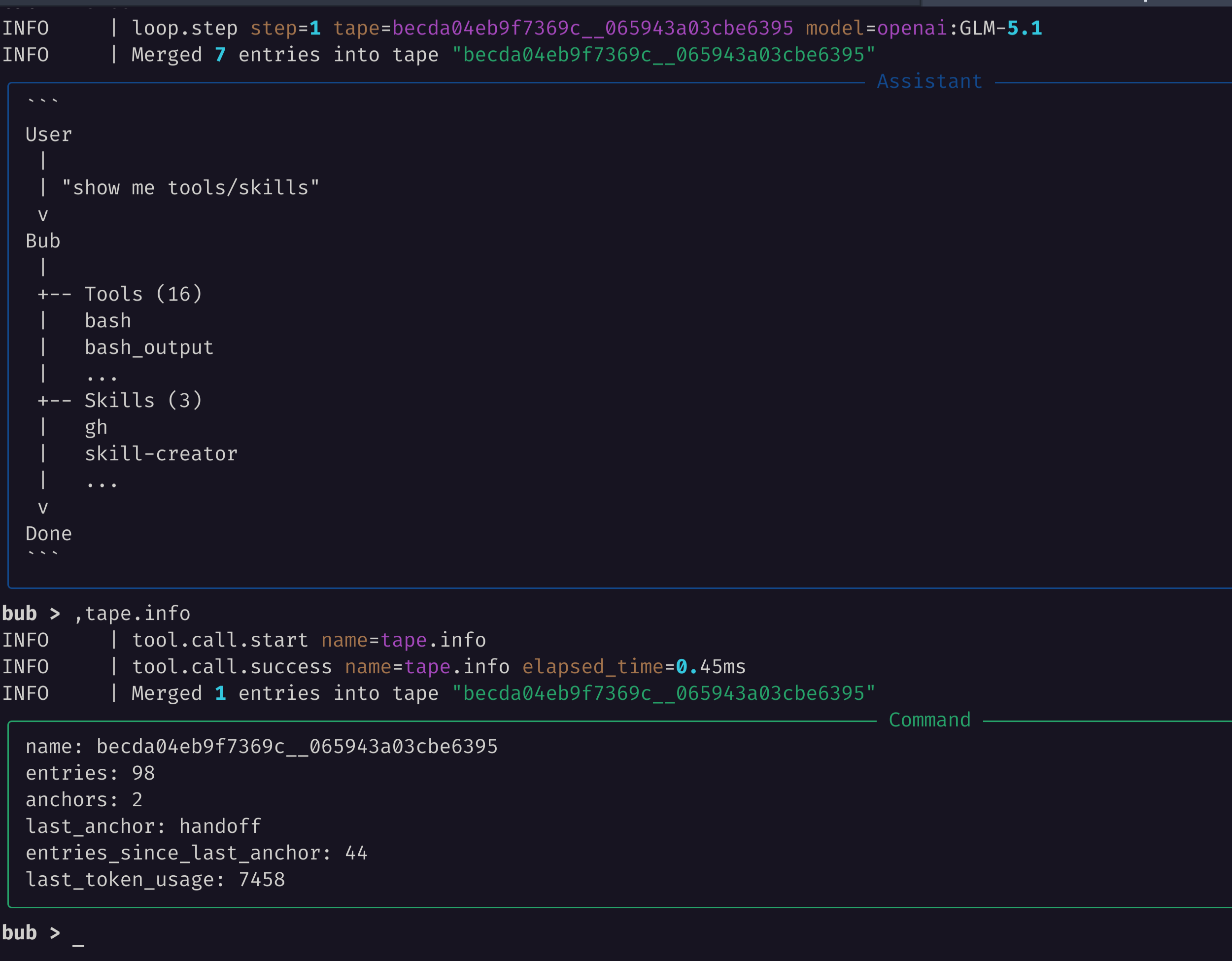
The fields are useful when the model starts behaving oddly:
entriestells you how much history the session has accumulated.anchorsandlast_anchortell you whether the tape has a checkpoint for context reconstruction.entries_since_last_anchortells you whether a handoff could shorten the next prompt.last_token_usageappears when token usage has been recorded by the model path.
Because Bub uses the tape model from tape.systems, the runtime can inspect its own operational record. Bub can answer questions about what happened because the tape is the same state it uses to rebuild context.
2. Search the tape for symptoms
Section titled “2. Search the tape for symptoms”Use tape.search when you need to find a prior tool call, error, or handoff:
uv run bub run ",tape.search query=loop.step"You can also ask the model to inspect the tape and explain what it sees:
uv run bub run "Inspect the current tape and summarize the last turn."That second command may call the model, so use it only after provider credentials are configured.
3. Start Phoenix locally
Section titled “3. Start Phoenix locally”Run Phoenix with OTLP HTTP ingestion enabled:
docker run --rm --name bub-phoenix \
  -p 6006:6006 \
  arizephoenix/phoenix:latest
Open the UI:
http://localhost:60064. Run Bub with contrib and OTLP
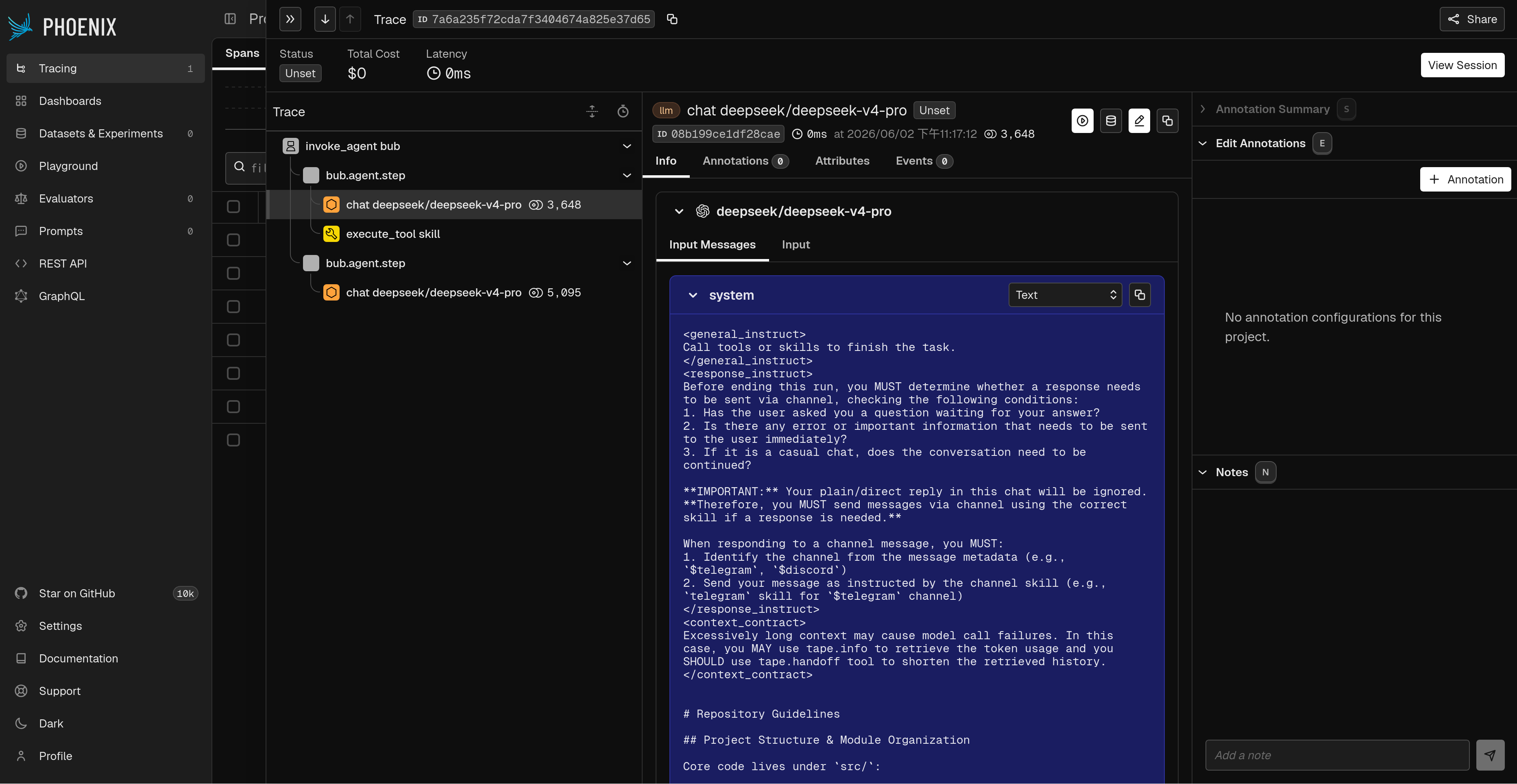
Section titled “4. Run Bub with contrib and OTLP”Bub already supports Logfire during CLI startup when the logfire extra is installed. The bub-tapestore-otel contrib plugin adds GenAI-oriented spans from Bub’s tape store, including invoke_agent bub, bub.agent.step, chat, and tool execution spans. This tutorial sends both to Phoenix through OTLP.
In another terminal, run:
LOGFIRE_SEND_TO_LOGFIRE=false \
LOGFIRE_SERVICE_NAME=bub \
BUB_TAPESTORE_OTEL_ENABLED=true \
BUB_TAPESTORE_OTEL_SERVICE_NAME=bub \
BUB_TAPESTORE_OTEL_AGENT_NAME=bub \
OTEL_EXPORTER_OTLP_TRACES_ENDPOINT=http://localhost:6006/v1/traces \
OTEL_EXPORTER_OTLP_TRACES_PROTOCOL=http/protobuf \
uv run --extra logfire bub run "What tools do you have, and what small tasks are they useful for?"
Then run the local tape check with the same telemetry settings:
LOGFIRE_SEND_TO_LOGFIRE=false \
LOGFIRE_SERVICE_NAME=bub \
BUB_TAPESTORE_OTEL_ENABLED=true \
BUB_TAPESTORE_OTEL_SERVICE_NAME=bub \
BUB_TAPESTORE_OTEL_AGENT_NAME=bub \
OTEL_EXPORTER_OTLP_TRACES_ENDPOINT=http://localhost:6006/v1/traces \
OTEL_EXPORTER_OTLP_TRACES_PROTOCOL=http/protobuf \
uv run --extra logfire bub run ",tape.info"
Use LOGFIRE_SEND_TO_LOGFIRE=false for local Phoenix tutorials so Bub does not try to send telemetry to the hosted Logfire backend. OTEL_EXPORTER_OTLP_TRACES_ENDPOINT points OpenTelemetry exporters at Phoenix’s OTLP HTTP endpoint.
5. Inspect the trace in Phoenix
Section titled “5. Inspect the trace in Phoenix”In Phoenix:
- Open the default project.
- Open the most recent trace.
- Look for
invoke_agent bub,bub.agent.step,chat <model>, andexecute_tool <tool>spans.
This path complements tape inspection:
- Tape answers “what did this Bub session remember?”
- Phoenix answers “how did this Bub agent turn run across model calls, tool calls, and tape updates?”
Use both when debugging production behavior: start with ,tape.info to understand the session state, then use Phoenix to inspect timing, errors, model calls, and tool calls.
Clean up
Section titled “Clean up”Stop Phoenix with Ctrl+C if it is running in the foreground. If it is detached, remove it:
docker rm -f bub-phoenixNext steps
Section titled “Next steps”- Tape and context — understand what Bub records and how context is rebuilt.